
Mastering the art of visual storytelling on Instagram requires more than just captivating photos; it demands a strategic approach to graphic design. This guide delves into the intricacies of creating engaging content, from understanding Instagram’s visual trends to leveraging its powerful design tools. We’ll explore color palettes, typography, image composition, and the nuances of Stories and Reels, empowering you to elevate your Instagram presence and connect with your audience on a deeper level.
Through practical examples, insightful tips, and a step-by-step approach, we aim to equip you with the knowledge and skills necessary to craft visually stunning and highly effective Instagram posts. Whether you’re a seasoned designer or just starting out, this comprehensive guide will provide valuable insights and actionable strategies to transform your Instagram feed into a powerful brand asset.
Understanding Instagram’s Visual Landscape
Instagram’s visual landscape is constantly evolving, driven by user preferences, technological advancements, and the platform’s own algorithm. Staying current with these trends is crucial for graphic designers aiming to create engaging and effective content. Understanding the dominant visual styles and the impact of different formats allows for strategic design choices that maximize visibility and engagement.
Current Trends in Instagram Visual Design
Currently, Instagram visuals showcase a blend of minimalist aesthetics and vibrant, maximalist approaches. Clean layouts with a focus on high-quality photography and a consistent color palette remain popular, particularly for brands aiming for a sophisticated image. Conversely, a trend toward bold, saturated colors, playful typography, and eclectic compositions is also prominent, often employed by artists and brands targeting younger demographics.
The use of storytelling through a series of images or videos is also highly effective, allowing for more detailed narratives and deeper audience engagement. Furthermore, the integration of user-generated content (UGC) into brand campaigns is becoming increasingly prevalent, leveraging authenticity and social proof. This trend emphasizes community building and organic reach.
Examples of Successful Instagram Visual Styles
- National Geographic (@natgeo): National Geographic consistently employs stunning high-resolution photography showcasing diverse landscapes, wildlife, and cultural moments. Their visual style is characterized by a commitment to exceptional image quality, a muted color palette often emphasizing earth tones, and minimal text overlays. This approach leverages the platform’s strength as a visual medium and reinforces their brand identity as a leader in exploration and discovery.
- Airbnb (@airbnb): Airbnb’s Instagram feed features a diverse range of visually appealing travel destinations and accommodations. Their style is bright, aspirational, and highly curated, focusing on showcasing the unique character of each location. They utilize a mix of professional photography and user-generated content, fostering a sense of community and inspiring wanderlust among their audience. A consistent color palette is not strictly adhered to, allowing for the vibrancy of the locations to take center stage.
- Adobe Creative Cloud (@adobecreativecloud): Adobe Creative Cloud’s Instagram feed is a vibrant showcase of creative work produced using their software. Their style is dynamic and diverse, reflecting the wide range of possibilities offered by their tools. They feature bold colors, creative typography, and a mix of imagery and video content. This reflects the brand’s association with innovation and creativity.
Impact of Aspect Ratios on Instagram Engagement
Different aspect ratios can significantly impact how your content is displayed on Instagram and, consequently, its engagement. A square (1:1) aspect ratio provides a balanced presentation, suitable for a variety of content types. However, the 16:9 aspect ratio (wide) can be more impactful for videos, showcasing a broader visual landscape. The 4:5 aspect ratio is ideal for showcasing portrait-oriented images, often maximizing the visual impact.
The optimal aspect ratio often depends on the specific content and desired effect. While A/B testing can provide valuable insights, understanding the visual strengths of each ratio is essential for informed design choices.
Comparison of Instagram Post Formats
| Post Format | Suitable for | Pros | Cons |
|---|---|---|---|
| Single Image | Showcase a single striking visual, product highlight, announcement | Simple, clean, easily digestible | Limited storytelling potential |
| Carousel | Product demonstrations, storytelling, step-by-step guides, behind-the-scenes looks | Allows for more in-depth storytelling, multiple product showcases | Requires more planning and content creation |
| Video | Tutorials, product demos, brand stories, engaging content | High engagement potential, dynamic and engaging | Requires video production skills and editing software |
| Reels | Short, engaging videos, showcasing products, trending sounds, quick tutorials | High reach potential through algorithm promotion, trend participation | Requires efficient video production and editing |
Color Palette Strategies for Instagram
A well-chosen color palette is crucial for creating a visually appealing and memorable Instagram presence. Consistent color use strengthens brand recognition and helps your content stand out in a crowded feed. Understanding how color affects perception and evokes emotion is key to maximizing your Instagram strategy.
Creating a cohesive color palette involves considering your brand’s identity, target audience, and the overall message you want to convey. This goes beyond simply picking colors you like; it requires a strategic approach to ensure visual harmony and brand consistency across all your posts.
Effective Color Palettes Used by Popular Brands
Many successful brands leverage the power of color palettes effectively on Instagram. For example, Starbucks utilizes a palette primarily based on greens and browns, reflecting nature and a sense of calm, aligning with their coffee shop ambiance. Conversely, Nike often employs vibrant, bold colors like reds, oranges, and yellows, reflecting energy, action, and athleticism. These choices aren’t accidental; they’re carefully curated to resonate with their respective target audiences and brand values.
Another example is Pantone, who, unsurprisingly, uses a wide variety of colors but often presents them in a clean, organized, and sophisticated way, reflecting their expertise in color systems.
Creating a Cohesive Color Palette
Developing a cohesive color palette starts with understanding your brand’s personality. Consider s that describe your brand – is it modern, rustic, playful, sophisticated? These s can guide your color choices. You can then use color tools, like Adobe Color or Coolors, to generate palettes based on a starting color or mood. Ensure the chosen colors work well together, creating a harmonious visual experience.
Maintaining consistency across your Instagram profile is vital; use the same or similar color palettes in your feed, highlights, and profile picture.
Three Color Palettes for Different Instagram Accounts
Here are three example color palettes designed for different Instagram account types:
Fashion: A sophisticated palette might include deep blues (#283B71), muted pinks (#D189B2), and creamy off-whites (#F2EAE2). This combination evokes elegance and high fashion. The deep blue provides a grounding element, the muted pink adds a touch of femininity, and the off-white creates a sense of airiness and luxury.
Food: A vibrant and appetizing palette could utilize warm tones like burnt orange (#CC5500), sunny yellow (#FFD700), and a rich brown (#A0522D). These colors stimulate appetite and create a sense of warmth and comfort, perfect for showcasing delicious food photography. The contrast between the warm tones adds visual interest.
Travel: An adventurous and inspiring palette might include teal (#008080), sandy beige (#F5F5DC), and a deep navy blue (#000080). These colors evoke a sense of exploration and adventure, reflecting the freedom and excitement of travel. The teal represents the ocean, the beige evokes sandy beaches, and the navy blue represents the night sky.
Using Color Psychology to Enhance Engagement
Color psychology plays a significant role in influencing viewer emotions and behavior. Warm colors (reds, oranges, yellows) are often associated with energy, excitement, and appetite, while cool colors (blues, greens, purples) are linked to calmness, trust, and serenity. Understanding these associations can help you choose colors that align with your desired engagement. For example, using warm colors might encourage impulsive purchases in an e-commerce context, whereas using cool colors might create a sense of trust and reliability for a financial services account.
Remember to test and analyze which color palettes resonate best with your audience.
Typography and Text Overlay Techniques
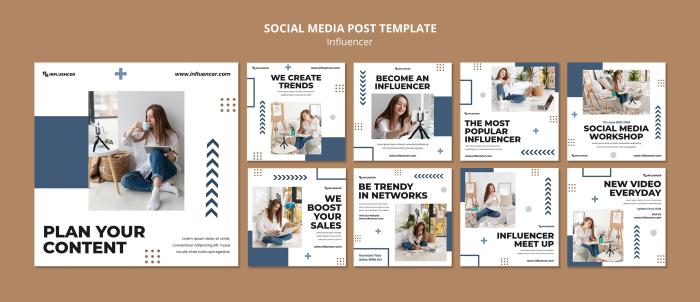
Effective typography is crucial for creating visually appealing and engaging Instagram content. The right font choices can significantly impact brand perception, conveying professionalism, playfulness, or sophistication, among other qualities. Mastering text overlay techniques allows you to seamlessly integrate your message with your visuals, enhancing the overall impact of your posts.Choosing the right font is more than just aesthetics; it directly influences how your audience perceives your brand.
Serif fonts (like Times New Roman or Garamond) often project a sense of tradition and formality, while sans-serif fonts (like Arial or Helvetica) tend to feel modern and clean. Script fonts (like Edwardian Script ITC or Pacifico) can add a touch of elegance or whimsy, depending on their style. Consider your brand’s personality and target audience when selecting fonts.
A playful brand might use a quirky display font, while a luxury brand would likely opt for something more refined.
Font Pairing Strategies for Instagram
Successful font pairings involve combining fonts that complement each other without clashing. A common approach is to pair a serif font with a sans-serif font, or a script font with a simple sans-serif for contrast and readability. For example, pairing a clean sans-serif like Montserrat with a more decorative script font like Great Vibes can create a visually interesting yet balanced look.
Avoid using too many different fonts in a single post, as this can appear cluttered and confusing. Sticking to two, at most three, fonts usually works best. The key is to ensure sufficient contrast in weight and style between the chosen fonts to enhance readability and visual appeal.
Effective Text Overlay Examples
Consider these examples of effective text overlays for different Instagram content types:A lifestyle photography post featuring a vibrant sunset might benefit from a simple, bold sans-serif font like Bebas Neue for a short, impactful caption overlaid directly on the image. The font’s boldness ensures readability against the bright background.A product launch post showcasing a new beauty product could utilize a more elegant serif font like Playfair Display for the product name, paired with a clean sans-serif like Lato for descriptive text.
This combination creates a sophisticated and professional look, suitable for the context.An inspirational quote graphic could employ a script font like Lobster for the quote itself, perhaps with a subtle drop shadow for enhanced readability, and a sans-serif font like Open Sans for attribution. The contrast between the elegant script and clean sans-serif adds visual interest.For video content, such as a behind-the-scenes look at a photoshoot, using a bold, easily readable sans-serif font for titles and key information ensures the message is clear even amidst moving visuals.
Subtitles, when used, should be in a simpler, easily digestible font. Keep text concise and to the point to avoid overwhelming the viewer. Avoid using overly decorative fonts, which can be hard to read on a moving screen.
Image Composition and Editing for Instagram
Crafting visually compelling Instagram posts requires a keen understanding of image composition and effective editing techniques. A well-composed image grabs attention and effectively communicates your message, while skillful editing enhances its impact and aligns with your brand aesthetic. This section will explore key aspects of both.
The Rule of Thirds and its Application
The rule of thirds is a fundamental principle of photography and design. It suggests that an image should be divided into nine equal parts by two equally-spaced horizontal lines and two equally-spaced vertical lines, and that important compositional elements should be placed along these lines or at their intersections. Applying this to Instagram, instead of centering your subject, position it at one of these intersection points to create a more visually engaging and balanced image.
For example, a picture of a landscape might place the horizon along the top horizontal line, emphasizing the sky, or along the bottom line, focusing on the foreground. Similarly, a portrait could position the subject off-center, allowing for more visual breathing room. This technique prevents a static, uninteresting feel.
Visual Hierarchy in Instagram Posts
Visual hierarchy guides the viewer’s eye through your image, directing attention to the most important elements first. A strong visual hierarchy ensures your key message isn’t lost amidst other visual details. This is achieved through the strategic use of size, color, contrast, and placement. Larger, brighter, or more sharply focused elements naturally draw the eye first. For instance, a product shot in a bright, contrasting color will stand out against a more muted background.
Consider using whitespace effectively; it helps to isolate key elements and prevent visual clutter.
Editing Instagram Photos Using Basic Tools
Instagram’s built-in editing tools offer a surprisingly robust set of options for enhancing your photos. A step-by-step guide using these tools might include:
- Brightness and Contrast: Adjust these to optimize the overall luminosity and tonal range of your image. Increasing contrast can make your subject pop, while adjusting brightness corrects for underexposure or overexposure.
- Saturation and Warmth/Coolness: Saturation controls the intensity of colors. Experiment with warmth (adding yellow/orange tones) or coolness (adding blue/purple tones) to achieve a desired mood or aesthetic.
- Sharpness: A touch of sharpness can improve clarity and detail, but avoid overdoing it, as this can lead to a grainy or artificial look.
- Highlights and Shadows: These tools allow for fine-tuning of the brightest and darkest areas of your image. Subtly adjusting highlights can prevent overblown areas, while lifting shadows can reveal detail in darker parts of the image.
Remember to edit subtly; the goal is to enhance, not to drastically alter the original image.
Leading Lines and Other Compositional Techniques
Leading lines are lines within an image that draw the viewer’s eye towards a particular point, often the main subject. These lines can be natural elements like roads, rivers, or fences, or they can be created through strategic placement of objects. Other compositional techniques include using symmetry or asymmetry to create balance, employing negative space to emphasize the subject, and using the rule of odds (grouping objects in odd numbers for a more visually pleasing arrangement).
For example, a photo of a pathway receding into the distance utilizes leading lines to guide the viewer’s gaze towards the end of the path, where the main subject might be located. The use of symmetry in an architectural photograph can create a sense of order and harmony.
Creating Engaging Instagram Stories and Reels
Instagram Stories and Reels offer dynamic ways to connect with your audience beyond static posts. Mastering these formats is crucial for boosting engagement and brand visibility. By utilizing visually appealing templates, strategic animation, and compelling content, you can create captivating experiences that resonate with your followers.
Eye-Catching Instagram Stories Templates
Effective Instagram Story templates provide a consistent brand aesthetic while offering diverse layouts for different content types. Consider using a consistent color palette, font choices, and graphic elements across your templates to maintain brand recognition. A well-designed template acts as a visual framework, allowing you to easily swap out content while retaining a polished look. For example, a template might feature a central area for a product image, with smaller sections for text and a call to action.
Another template could use a split screen to show a before-and-after effect.
Animation and Motion Graphics in Instagram Reels
Animation and motion graphics significantly elevate the visual appeal and engagement of Instagram Reels. They can add dynamism, highlight key information, and enhance storytelling. Tools like Adobe After Effects, Canva, and even Instagram’s built-in editing tools offer various animation options. Consider using simple transitions, subtle text animations, or even animated illustrations to keep viewers engaged. For example, a product reveal could be enhanced with a zoom animation, or a behind-the-scenes video could utilize kinetic typography to emphasize key words.
Instagram Story Templates for Different Purposes
Below are three examples of Instagram Story templates designed for specific purposes:
- Product Promotion Template: This template features a high-quality image of the product in the center, with a brief, compelling caption at the bottom. A small animated GIF showcasing a customer testimonial could be placed in the upper left corner. A call to action (“Shop Now!”) with a swipe-up link would be prominent in the lower right. The overall color scheme should align with your brand identity.
- Behind-the-Scenes Template: This template uses a split-screen design. One side shows a short video clip of the creative process (e.g., sketching, designing), while the other side displays a text overlay describing the scene. The overall aesthetic is raw and authentic, emphasizing the human element of your brand.
- Q&A Template: This template uses a clean, minimalist design. A question is displayed prominently, followed by a concise answer in a contrasting color. This template could incorporate animated arrows to guide the viewer’s eye through the information, making the flow intuitive and engaging. The background color could be subtly animated with a gradient effect to add visual interest.
Best Practices for Text, Stickers, and GIFs in Stories and Reels
Effective use of text, stickers, and GIFs enhances the visual appeal and information clarity of your Stories and Reels. Text should be concise, easy to read, and use a font that complements your brand’s visual identity. Stickers can add visual interest, provide context, and encourage interaction (e.g., polls, quizzes). GIFs can inject humor, emphasize a point, or create a more dynamic visual experience.
Avoid overcrowding your Stories and Reels with too many elements. Maintain a balance between visual elements and textual information to ensure optimal readability and engagement. For example, using a simple sans-serif font for text overlays will ensure readability, while carefully chosen GIFs can add a touch of personality and humor without distracting from the main message.
Leveraging Instagram’s Design Tools and Features
Instagram offers a suite of built-in tools and features designed to enhance your visual content. Understanding and effectively utilizing these tools can significantly improve the quality and consistency of your Instagram presence, without requiring extensive knowledge of external software. This section explores Instagram’s native editing capabilities, the advantages and disadvantages of third-party apps, and provides a selection of essential design tools for creating a cohesive and engaging feed.Instagram’s built-in editing tools provide a quick and easy way to adjust your photos and videos before posting.
These tools are readily accessible, requiring no additional downloads or subscriptions. However, their functionality is more limited compared to professional editing software. The filters, for instance, offer a range of stylistic choices, from subtle adjustments to dramatic transformations. The tools for brightness, contrast, saturation, and sharpness allow for basic color correction and image enhancement. While these are useful for quick edits, more advanced adjustments might necessitate the use of external applications.
Instagram’s Built-in Editing Tools
Instagram’s editing tools are intuitive and user-friendly. The interface presents options for adjusting brightness, contrast, saturation, warmth, and sharpness. Users can also add filters, which apply pre-set color and tonal adjustments. Furthermore, tools for cropping, straightening, and adjusting highlights and shadows allow for more precise image manipulation. These basic features are suitable for making quick edits and improving the overall aesthetic of an image before posting, ensuring that it aligns with the overall feed aesthetic.
Advantages and Disadvantages of Third-Party Editing Apps
Third-party apps offer a broader range of editing features compared to Instagram’s built-in tools. These apps often include advanced functionalities like selective adjustments, precise color grading, and sophisticated masking techniques. However, using third-party apps adds an extra step to the posting process and may require a learning curve to master their interface and features. Some popular examples include VSCO, Snapseed, and Lightroom Mobile.
While these offer greater creative control, they can also be time-consuming, particularly for users unfamiliar with photo editing. The choice depends on the user’s skill level and desired level of control over their images.
Five Essential Instagram Design Tools
Choosing the right tools significantly impacts the visual appeal and consistency of your Instagram feed. The selection below offers a blend of built-in and third-party options catering to different skill levels and needs.
- Instagram’s built-in editor: Offers basic adjustments for brightness, contrast, saturation, and sharpness, alongside a variety of filters for quick stylistic changes.
- VSCO: Known for its film-inspired filters and advanced editing capabilities, providing more nuanced control over color and tone.
- Canva: A versatile design tool allowing users to create graphics, collages, and other visual content ideal for Instagram posts and stories.
- Lightroom Mobile: Adobe’s mobile app offers powerful editing tools, similar to its desktop counterpart, providing advanced color correction and image manipulation capabilities.
- Unfold: Focuses on creating visually appealing Instagram Stories, providing templates and tools for designing cohesive story layouts.
Creating a Visually Consistent Feed
A consistent Instagram feed creates a strong visual identity. Instagram’s layout features, while limited, can aid in achieving this. While there’s no direct tool for pre-planning a grid layout within the app, careful planning and selection of images with a cohesive color palette and style are crucial. Consider using a third-party app to plan your feed’s aesthetic before posting, visualizing how individual images will interact within the overall grid.
This pre-planning allows for a more cohesive and visually appealing feed. For example, planning a feed with a predominantly cool color palette or a specific filter style can create a unified and recognizable aesthetic.
Designer Tips and Design Services
Successfully navigating the visual landscape of Instagram requires a blend of artistic flair and a deep understanding of the platform’s nuances. Graphic designers specializing in Instagram content play a crucial role in helping businesses and individuals establish a strong online presence. This section delves into the essential skills, services offered, design brief creation, and pricing models employed by these professionals.This section Artikels the key skills, services, and processes involved in providing effective graphic design services for Instagram.
Understanding these aspects is crucial for both designers seeking to specialize in this area and clients looking to commission high-quality Instagram content.
Essential Skills for Instagram Graphic Designers
A successful Instagram graphic designer possesses a diverse skillset. These skills extend beyond purely artistic abilities to encompass a comprehensive understanding of the platform’s mechanics and audience engagement strategies. Proficiency in these areas is paramount to delivering visually appealing and effective content.
- Proficient in Adobe Creative Suite: Fluency in Photoshop, Illustrator, and InDesign is essential for creating high-quality visuals, from static posts to intricate story templates.
- Understanding of Instagram’s Algorithm and Best Practices: Knowledge of optimal image sizes, posting times, and hashtag strategies is critical for maximizing reach and engagement.
- Brand Identity and Visual Storytelling: The ability to translate a brand’s message into a cohesive and visually compelling Instagram presence is paramount.
- Strong Composition and Color Theory Skills: Creating visually appealing and balanced designs is fundamental to capturing attention in a crowded feed.
- Video Editing Skills (for Reels and Stories): Expertise in editing short-form video content is increasingly important for success on Instagram.
- Excellent Communication and Client Management Skills: Effectively communicating with clients to understand their needs and deliver exceptional results is crucial.
Services Offered by Instagram Graphic Designers
The services offered by Instagram graphic designers are varied and cater to a range of client needs, from creating individual posts to managing entire brand identities. These services often encompass a combination of design, strategy, and content creation.
- Social Media Template Design: Creating pre-designed templates for consistent branding across posts and stories.
- Individual Post Design: Designing individual images and videos for specific campaigns or promotions.
- Instagram Story and Reel Creation: Designing engaging and interactive content for Stories and Reels.
- Brand Identity Design for Instagram: Developing a comprehensive visual identity, including logos, color palettes, and typography, specifically tailored for Instagram.
- Instagram Content Strategy: Developing a content calendar and strategy to maximize reach and engagement.
- Hashtag Research and Implementation: Identifying relevant hashtags to increase the visibility of posts.
Creating a Design Brief for Instagram Graphic Design Projects
A well-defined design brief is essential for ensuring a successful collaboration between a client and a graphic designer. This document serves as a roadmap, outlining project goals, target audience, and specific design requirements. A clear brief minimizes misunderstandings and ensures the final product aligns with the client’s vision.The design brief should include the following elements:
- Project Goals: What does the client hope to achieve with the Instagram content?
- Target Audience: Who is the intended audience for the content? (demographics, interests, etc.)
- Brand Guidelines: Existing brand guidelines (logo, color palette, typography, etc.)
- Content Style and Tone: Desired aesthetic (e.g., minimalist, vibrant, playful) and overall tone of voice.
- Specific Design Requirements: Dimensions, file formats, number of posts/stories, etc.
- Timeline and Budget: Project deadlines and allocated budget.
Pricing Models for Instagram Graphic Design Services
Graphic designers employ various pricing models, each with its own advantages and disadvantages. The optimal model depends on the scope of the project, the designer’s experience, and client preferences.
- Hourly Rate: The designer charges an hourly fee for their services. This is suitable for projects with uncertain scopes or requiring ongoing support.
- Project-Based Fee: A fixed fee is agreed upon for the entire project, regardless of the time spent. This offers clarity and predictability for both parties.
- Package Deals: Pre-defined packages offering a set number of services at a fixed price. This is ideal for clients with recurring needs.
- Retainer Fee: A monthly fee for ongoing design support and content creation. This is beneficial for clients requiring consistent content updates.
By understanding Instagram’s visual landscape, mastering color palettes and typography, perfecting image composition, and leveraging the platform’s design tools, you can create a visually consistent and engaging Instagram presence. Remember that consistent effort and a keen eye for detail are key to success. Embrace experimentation, analyze your results, and continuously refine your approach to unlock the full potential of Instagram’s visual power.
Your captivating visuals will not only attract followers but also build a loyal and engaged community around your brand.
Q&A
What are the best free graphic design tools for Instagram?
Canva and Adobe Express offer robust free options with many design templates and features. Instagram’s built-in editor is also a convenient choice for quick edits.
How often should I post on Instagram to maintain engagement?
Consistency is key, but the optimal posting frequency depends on your niche and audience. Experiment to find what works best, but aim for a regular schedule.
How can I track the performance of my Instagram posts?
Instagram Insights provides valuable data on reach, engagement, and audience demographics. Regularly analyze this data to understand what resonates with your audience and refine your strategy.
What are some common mistakes to avoid in Instagram graphic design?
Overusing filters, ignoring brand consistency, poor image quality, and neglecting text readability are common pitfalls. Prioritize clear messaging and high-quality visuals.


